Log into your Stripe Dashboard. Create a new Product and give it one Price for monthly billing, and a second Price for annual billing if you want that option too. This step can only be done in Stripe – the site has no “create new tier” button, on purpose, since prices in Stripe can never be edited once made, only replaced.
Password: xxxxxxxxxx
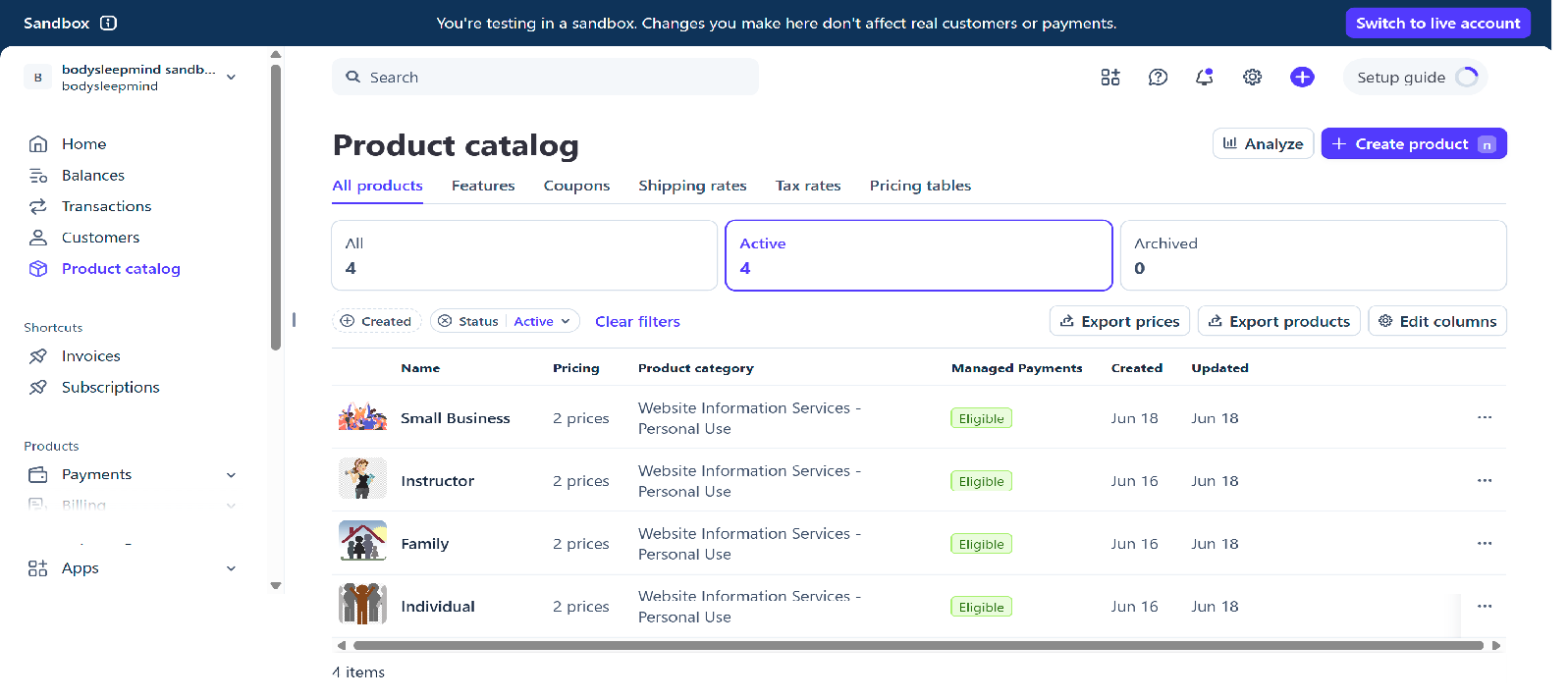
- Log into dashboard.stripe.com
- In the left sidebar, click Product catalog (sometimes labelled “Products”)
- Click the + Add product button, top right
- Fill in the name (e.g. “Corporate Wellness”), description, and set the price – pick “Recurring” so it charges monthly/annually like your other tiers. You can add both a monthly and an annual price on the same screen
- Click Save
Go to /admin-stripe-product-mini-crud/ on your site. It automatically pulls in every active product from your Stripe account – your new one will already be listed, even though the site doesn’t know about it yet.
Next to your new product, set: how many member seats it includes, whether it should show a “Most Popular” badge, and what order it appears in on the pricing page. These details live only on your site, not in Stripe.
Click through the confirm steps. This does two things at once: updates the product info in Stripe, and copies everything (including the Price IDs) into the site’s own tier list.
Your new tier now appears automatically on /plans-page/, and the checkout button for it works immediately. Nothing else to configure – no code, no other files.
if(!function_exists()) blocks are NOT hoisted by PHP. The webhook file defines all functions at the TOP of the file before any execution code. Never move them below the execution code or you will get a fatal 500 error.page-protect.php. The upgrade page content is loaded separately via shortcode on the /upgrade-page/ WordPress page. Never swap these or the upgrade page will show on every page of the site./admin-stripe-product-mini-crud/, gated by an admin-only check inside the page itself, not a native WordPress admin screen — and by webhooks. Fast as any local DB query, zero Stripe API calls on page load ever.You need a Stripe account before anything else. All setup must be done in SANDBOX (test) mode — never live mode during setup.
- Go to https://stripe.com and sign in (or create an account)
- Look at the top right of the Stripe dashboard — it should say SANDBOX with a toggle. Make sure you are in sandbox mode before doing anything else
- If it says LIVE — click the toggle to switch to sandbox. Live mode uses real money.
API keys are how BSM talks to Stripe. You need two: a publishable key (safe for front end) and a secret key (server only, never share).
- Copy your Publishable key — starts with
pk_test_...— safe for frontend use - Copy your Secret key — starts with
sk_test_...— server only, never paste this anywhere public - Store both securely — you will need them in Step 6
Each BSM membership tier is a Stripe product. Stripe is the single source of truth for all tier definitions — name, description, price, seat count, display order, and featured status. BSM reads this data into a local database table and never calls the Stripe API on page load.
Adding a new tier is a zero-code process: create the product in Stripe, set the metadata fields below, and it appears on the site automatically within seconds. Removing a tier means archiving it in Stripe — it disappears from the site immediately.
For each product set the following:
Metadata fields — exactly three, set on each product:
Current live tiers:
The customer portal is a Stripe-hosted page where subscribers can manage their own subscription — update their card, view invoices, or cancel. Users access it via the Manage Billing button on their BSM account page.
- Enable the portal
- Under Functionality enable: Update payment methods, Cancel subscriptions, View billing history
- Under Cancellation set to: Cancel at end of billing period — users keep access until their paid period runs out
- Under Business information → Return URL enter:
https://bodysleepmind.com/account/ - Click Save
billing.stripe.com/... — this is normal and expected. It is Stripe's hosted page. The “Sandbox” badge will disappear when you switch to live mode.
A webhook is how Stripe tells BSM when something happens. BSM listens to eleven events: five for user subscription state and six for keeping the local product/price table in sync with Stripe.
- Endpoint URL:
https://bodysleepmind.com/bsm-stripe-webhook/ - Under Select events add all eleven events listed below
- Click Add endpoint
- On the next screen find Signing secret and click Reveal
- Copy the signing secret immediately — starts with
whsec_...— this is only shown once
User subscription events (5):
checkout.session.completed — payment succeeded, set user to paid, write tier and Stripe IDs to GOD JSONcustomer.subscription.updated — subscription status changedcustomer.subscription.deleted — subscription ended, revert user to activeinvoice.payment_succeeded — monthly renewal paid, confirm paid statusinvoice.payment_failed — renewal failed, revert user to activeProduct and price sync events (6):
product.created — new tier in Stripe, upsert row in bsm_stripe_productsproduct.updated — tier name, description or metadata changed, update rowproduct.deleted — tier archived in Stripe, set active = 0, card disappears from siteprice.created — new price added, update price ID and amount on rowprice.updated — price amount changed, update amount on rowprice.deleted — price removed, clear price ID and amount on rowThree Stripe credentials are stored as WordPress options — never hardcoded in PHP files. No Price IDs are stored as WordPress options; those live in the bsm_stripe_products database table managed by webhooks.
<?php
update_option('bsm_stripe_secret_key',       'sk_test_YOUR_KEY_HERE');
update_option('bsm_stripe_publishable_key',  'pk_test_YOUR_KEY_HERE');
update_option('bsm_stripe_webhook_secret',   'whsec_YOUR_SECRET_HERE');
?>
BSM reads all tier data at runtime from a local WordPress database table. This table is never edited manually — it is created on setup and kept current by Stripe webhooks. No Stripe API calls are made on page load ever.
| Column | Type | Notes |
|---|---|---|
tier_key | varchar(100) | Primary key. Auto-generated slug from Stripe product name via sanitize_title(). e.g. individual |
name | varchar(255) | Display name from Stripe product name field |
description | text | Card description from Stripe product description field |
seats | int | From Stripe metadata: seats |
featured | tinyint(1) | From Stripe metadata: featured (true/false → 1/0) |
display_order | int | From Stripe metadata: order |
price_monthly_id | varchar(100) | Stripe Price ID for monthly billing |
price_monthly_amount | int | Amount in pence |
price_annual_id | varchar(100) | Stripe Price ID for annual billing |
price_annual_amount | int | Amount in pence |
active | tinyint(1) | 1 = active and shown. 0 = archived in Stripe, hidden from site. |
updated_at | datetime | Timestamp of last webhook sync |
CREATE TABLE IF NOT EXISTS bsm_stripe_products (
    tier_key             VARCHAR(100) NOT NULL,
    name                 VARCHAR(255) NOT NULL DEFAULT '',
    description          TEXT,
    seats                INT NOT NULL DEFAULT 0,
    featured             TINYINT(1) NOT NULL DEFAULT 0,
    display_order        INT NOT NULL DEFAULT 0,
    price_monthly_id     VARCHAR(100) NOT NULL DEFAULT '',
    price_monthly_amount INT NOT NULL DEFAULT 0,
    price_annual_id      VARCHAR(100) NOT NULL DEFAULT '',
    price_annual_amount  INT NOT NULL DEFAULT 0,
    active               TINYINT(1) NOT NULL DEFAULT 1,
    updated_at           DATETIME NOT NULL,
    PRIMARY KEY (tier_key)
) ENGINE=InnoDB DEFAULT CHARSET=utf8mb4;
The table is populated and kept current using a dedicated front-end admin page rather than a one-time script. This was a deliberate choice: a script you run once and never see again is opaque and easy to forget how to re-run if something needs fixing. A standing page keeps a human in the loop permanently, shows live Stripe data side by side with what BSM currently has stored, and requires explicit confirmation before anything changes. This is not a native WordPress wp-admin screen — it is a regular front-end page, the same architecture as every other Stripe file in this build, reached at its own URL rather than through the WordPress admin sidebar.
/admin-stripe-product-mini-crud/ — a real WordPress page, not the wp-admin sidebar. Reached today via a “BSM Admin” button that only renders on admin account menus — an internal links page lists this alongside other staff tools (user management, deletion, Stripe config).
page-protect.php to explicitly block non-admins from every bsm-admin-* URL, the same whitelist mechanism already protecting every other page in this build.
- Open the page. It fetches live data from Stripe on every load — name, description, metadata, and prices for every active product
- For first-time population, the right-hand column will show “Not yet in local table” for every row
- Review the fields. If everything looks correct as-is, no edits are needed — just proceed to Save Changes to write the current Stripe values into the table for the first time
- Click Save Changes → confirm the warning → review the diff screen → click the green Implement Changes button
- The right-hand column should now show “In sync” for every tier
Seven Stripe/billing PHP files are fired via functions.php using WordPress's template_redirect hook. This is the correct approach because template_redirect fires before any page output is sent, which allows the PHP to set HTTP response codes and redirect headers correctly. WPCode auto-insert runs too late in the lifecycle.
/*******************stripe checkout***************************/
add_action('template_redirect', 'bsm_stripe_checkout_handler');
function bsm_stripe_checkout_handler() {
    if (!is_page('checkout')) { return; }
    include( get_stylesheet_directory() . '/stripe/bsm-stripe-checkout.php' );
}

/*******************stripe webhook***************************/
add_action('template_redirect', 'bsm_webhook_real_handler');
function bsm_webhook_real_handler() {
    if (!is_page('bsm-stripe-webhook')) { return; }
    include( get_stylesheet_directory() . '/stripe/bsm-stripe-webhook.php' );
}

/*******************stripe portal***************************/
add_action('template_redirect', 'bsm_stripe_portal_handler');
function bsm_stripe_portal_handler() {
    if (!is_page('billing-portal')) { return; }
    include( get_stylesheet_directory() . '/stripe/bsm-stripe-portal.php' );
}

/*******************stripe cancel***************************/
add_action('template_redirect', 'bsm_stripe_cancel_handler');
function bsm_stripe_cancel_handler() {
    if (!is_page('cancel-subscription')) { return; }
    include( get_stylesheet_directory() . '/stripe/bsm-stripe-cancel.php' );
}

/*******************stripe undo cancel***************************/
add_action('template_redirect', 'bsm_stripe_undo_cancel_handler');
function bsm_stripe_undo_cancel_handler() {
    if (!is_page('undo-cancel')) { return; }
    include( get_stylesheet_directory() . '/stripe/bsm-stripe-undo-cancel.php' );
}

/*******************billing history***************************/
add_action('template_redirect', 'bsm_billing_history_handler');
function bsm_billing_history_handler() {
    if (!is_page('billing-history')) { return; }
    include( get_stylesheet_directory() . '/stripe/bsm-billing-history.php' );
}

/*******************update details***************************/
add_action('template_redirect', 'bsm_update_details_handler');
function bsm_update_details_handler() {
    if (!is_page('update-details')) { return; }
    include( get_stylesheet_directory() . '/stripe/bsm-update-details.php' );
}
Stripe is the single source of truth for every tier. Nothing about a tier — its existence, its name, its price — is ever defined in code. This section explains exactly what that means in practice: how a brand-new tier comes into being, what the internal admin panel can and cannot touch, and the precise steps to change a price.
A tier is never created in this codebase. It is created in Stripe, and the site simply notices and reflects it:
- Someone with Stripe access creates a new Product in the Stripe Dashboard (Product catalog → Add product), giving it a name, description, and at least one price
- The moment that product is saved, Stripe fires a
product.createdwebhook event to our endpoint - The webhook handler (Part 3) receives this event and inserts a brand-new row into
bsm_stripe_products— this is the only place a tier “exists” as far as our code is concerned - That new row is immediately visible in the internal admin panel below, ready to have its
tier_key, seats, featured status and display order set - Once saved there, it appears automatically on the Plans page and Upgrade page — no code change, no deployment, no developer involvement required
The reverse is just as direct: archiving a product in Stripe fires product.updated with active: false, which the webhook reflects by setting that row’s active column to 0 — it disappears from every customer-facing page immediately, without being deleted from the table (so its history and any past subscriptions referencing it remain intact).
Staff refer to bsm-stripe-product-crud.php as “the CRUD” — not technically accurate (it cannot Create or Delete a product, only Read and Update), but that is the name in everyday use, so this guide uses it too.
| Field | Editable here? | Where it actually lives |
|---|---|---|
name | Yes | Edited here, pushed to Stripe via bsm_admin_stripe_post() |
description | Yes | Edited here, pushed to Stripe |
seats | Yes | Local only — stored as Stripe product metadata, not a native Stripe field |
featured | Yes | Local only — Stripe metadata |
display_order | Yes | Local only — Stripe metadata |
price_monthly_amount | No — read only | Synced FROM Stripe, never written back. See price-change steps below. |
price_annual_amount | No — read only | Synced FROM Stripe, never written back. |
Creating a brand-new product and deleting one are both also not possible from this panel — both must happen in Stripe’s own dashboard first, as described above.
There is no “change price” button anywhere — not in this panel, not in Stripe itself. Stripe prices are immutable by design: once created, a price object can never be edited, only archived. A price change is therefore always a three-step replace operation:
- In Stripe Dashboard, open the product, click Add another price, and create the new price at the new amount
- Archive the old price (still on the product page) so it can no longer be selected for any new subscription — existing subscribers on the old price are unaffected and keep paying the old amount until they themselves change plan or re-subscribe
- Return to the internal admin panel and click Save Changes for that product — this re-fetches the now-current price from Stripe and writes the new amount into
price_monthly_amount/price_annual_amount, which is what the Plans page and Upgrade page actually display
/admin-stripe-product-mini-crud/ — not a native wp-admin screen. Reached today via a “BSM Admin” button shown only on admin account menus; no server-side permission check exists in the file itself yet, confirmed from its own header comment. Fetches live Stripe data on every load, shown alongside the current bsm_stripe_products row for comparison. Admin can edit name, description, seats, featured, and order. Prices are read-only. Every change requires two confirmations — a warning screen, then a field-by-field diff screen — before a final green Implement Changes button writes to both Stripe and the local table in the same action.The "MEMBERSHIP PARAMETERS": "__PSEUDO_PARENT__" line is just a section divider — it groups the keys below it for human readability when inspecting a record directly in phpMyAdmin. It provides no function and is never read or written by any code. The same applies to the separate "SYSTEM_TOKENS_METADATA": "__PSEUDO_PARENT__" divider seen grouping the AI cost-tracking fields elsewhere in the same record.
- membership_tier — the user’s tier_key (e.g.
individual,family). Read by the account page, plans page, manage-sub-members.php and the cancel confirmation screen to look up the matching row inbsm_stripe_products. Written by the webhook on checkout/upgrade. - membership_seats — count of entries in
sub_members[], kept in sync by manage-sub-members.php every time an invite is sent or a member is removed. Not itself the seat limit — the limit comes from the table, this is the count in use. - sub_members[] — array of every person this user has invited. Each entry holds
email,name,status(invitedoractive),user_id,invite_token,invited_date,joined_date. Written by manage-sub-members.php on invite/remove, and updated by onboard-spa.php when an invitee completes their own onboarding. - stripe_customer_id / stripe_subscription_id — the live Stripe IDs for this user. Written by the webhook on checkout completion, read by the cancel/undo-cancel files to know which subscription to act on.
- stripe_next_billing — the date the current billing period ends, shown on the account page as “Active until” / “Next billing date”. Written by the webhook, reading
current_period_endfrom the correct nested location in the Stripe payload. - subscription_start_date / subscription_cancelled_date — set by the webhook at checkout and at the moment
cancel_at_period_endis toggled, respectively.subscription_cancelled_datebeing non-empty is what the account/plans pages check to show the “Cancelling” badge. - registration_source — confirmed written as
"stripe_checkout"on a real paid signup. Only that one value has actually been observed; whether other values exist for other signup paths is not confirmed. - parent_user_id / member_role — set on a sub-member’s own GOD JSON by onboard-spa.php when they complete onboarding via an invite link.
member_roleismember(Family),client(Instructor) oremployee(Business). Both cleared back to empty when the master removes that sub-member.
These keys exist in real GOD JSON dumps, all currently sitting empty, but no file reviewed so far reads or writes any of them. Their intended purpose is inferred from the key name only and has not been confirmed:
- stripe_payment_method, stripe_last4 — presumably intended to cache the card type/last 4 digits for display without an extra Stripe API call, but nothing currently populates them.
- email_verified, email_verified_date, email_verify_reminder_sent — presumably an email verification flow, separate from the welcome/verification emails sent by onboard-spa.php (which use a separate WordPress user-meta token, not these GOD JSON fields).
- registration_date — distinct from the confirmed
subscription_start_date; presumably meant to record account creation date regardless of payment status, but not seen written anywhere. - subscription_end_date, subscription_cancel_reason —
subscription_end_datewas seen explicitly set to empty string by the checkout handler on a fresh signup (clearing any stale value), but never seen populated with a real date.subscription_cancel_reasonhas no observed write path at all — the current cancel flow does not collect a reason. - pwa_installed, pwa_install_date, pwa_prompt_shown, pwa_prompt_date — presumably tracking for a Progressive Web App install prompt, entirely unrelated to the Stripe/membership work.
- last_login_date — presumably set on every login, not reviewed.
- partner_profile_slug, partner_profile_live, partner_bio, partner_region — named after the old “Partner” tier (now renamed Instructor) and likely predate the tier rename. May relate to a professional profile page feature for Instructor-tier users, but no file implementing it has been reviewed.
This glossary only covers the membership-parameters block. Other GOD JSON sections (wellness study results, onboarding snapshot, AI cost tracking) exist in the same record but are outside this scope.
Any cancellation or primary account deletion — voluntary or, at period end, automatic — is a full reset of the group, with no exceptions. Every active sub-member is detached, regardless of how many seats the new state would allow. There is no logic anywhere in the system that calculates which members “fit” and which do not — that calculation does not exist by design. No auto-reinstatement. No magic. The primary account holder must resubscribe and re-invite every member from scratch, one at a time, from the seats management page.
- User clicks a higher tier on the plans page → routed to
/checkout/?tier=X&period=Y - bsm-stripe-checkout.php cancels the existing Stripe subscription immediately
- A new Stripe Checkout Session is created for the new tier
- On payment success the webhook updates GOD JSON: new tier_key, new sub ID, new stripe_next_billing, user_status stays paid
- New seats become available immediately. Existing sub-members are unaffected, since nothing about their own data changes.
parent_user_id would still point at the primary, but nothing currently runs the detachment logic on this specific path the way it does for a genuine cancellation or deletion. This needs deliberate testing before it can be documented as known behaviour, not assumed from how the similar paths work.
- User clicks Cancel subscription on the account page → routed to
/cancel-subscription/ - If the user has active sub-members, the confirmation screen lists each one by name and email and states they will lose access too on the same date
- Single-click confirm — no typed confirmation step exists today
- On confirm: Stripe API call sets
cancel_at_period_end: true. Every active sub-member is emailed immediately. The primary holder sees an on-screen success message only — no email to them. - User keeps full paid access until the period genuinely ends
- At period end Stripe fires
customer.subscription.deleted→ webhook reverts the primary'suser_statusto active (free), and for every active sub-member clearsparent_user_idandmember_roleon their own GOD JSON. The primary'ssub_members[]array is emptied entirely — entries are removed, not flagged with a status.
sub_members[] entry: invited (sent, not yet accepted) and active (accepted and joined). There is no third “lapsed” status anywhere in the real code. When a sub-member’s access ends — whether by manual removal, full-group reset, or the primary deleting their account — their entry is removed from the array entirely, and their own GOD JSON has parent_user_id and member_role cleared back to empty strings. They simply become an ordinary free user.
- Their entry is removed from the primary's
sub_members[]array parent_user_idandmember_roleare cleared to empty strings on their own GOD JSON- Sub-member retains full GOD JSON and all wellness data — nothing of their own is ever deleted by this
- Sub-member drops to ordinary free tier access — treated exactly as any free user from this point
- No suspension, no login block, no data loss
member_role— set when a user joins a group via an accepted invite. The real values in use are member (Family), client (Instructor), and employee (Business) — set by onboard-spa.php based on the inviter's tier at the moment the invite was sent.parent_user_id— the WordPress user ID of their primary account holder. Used to identify which group they belong to.- Both fields are cleared back to empty strings whenever a sub-member is detached, by any path
sub_members[] on this path at all) or when they delete their own account (the self-delete file has no sub-member-specific logic whatsoever — it only ever touches the deleting user's own data). In both cases the primary's seat count will not reflect reality until they manually notice and remove the now-orphaned entry themselves via manage-sub-members.php.
- This is a distinct, deliberate action available to the primary holder on the seats management page — separate from the automatic full-group reset triggered by cancellation or account deletion
- The primary holder can remove any individual active sub-member at any time, for any reason, without affecting their own subscription or any other member
- On removal: the entry is deleted from
sub_members[], andparent_user_id/member_roleare cleared on the removed member's own GOD JSON - The freed seat becomes immediately available for the primary holder to invite someone else into, without needing to resubscribe
- This manual removal is the only single-seat detachment path that has actually been built and proven — live-tested today with a real removal
Cancellation for a primary account holder with active sub-members shows the real impact before they confirm. This is the genuine, live flow in bsm-stripe-cancel.php, proven with real users today — not an aspirational design.
- Single screen, shown before anything is cancelled
- If the master has active sub-members: states the exact count, lists each one by name and email, and explains plainly that they will lose access too and become free users on the same date
- If the master has no active sub-members (or is on the Individual tier, which never has any): the screen is simpler — just the standard “you’ll keep access until period end” message
- Two buttons: Yes, cancel my subscription (red) and Never mind, keep my plan (teal)
- Confirmation is a single click — there is no typed-confirmation step (typing “CANCEL” or an email address). This is a deliberate gap, not an oversight: see the note below.
- Stripe API call sets
cancel_at_period_end: trueon the live subscription — the subscription itself keeps running, billing continues as normal, until the period genuinely ends - Every active sub-member is sent a styled HTML email immediately, stating the real end date, reassuring them their account and data are untouched, and a link to the Plans page encouraging them to start their own plan if they want to keep their access
- The primary holder sees a plain success message on screen (“Your subscription is set to cancel…”) — no email is currently sent to the primary holder themselves, only to their sub-members. This is a genuine gap, listed below.
- The account page and plans page both immediately reflect the “Cancelling” state, with a working “Stop the cancellation” link
- Stripe fires
customer.subscription.deletedwhen the billing period genuinely ends - The webhook reverts the primary’s
user_statusto free, and automatically detaches every active sub-member — clearingparent_user_idandmember_roleon each one’s own GOD JSON, and emptying the primary’ssub_members[]array - No further email is sent at this point to either the primary or the sub-members — the only cancellation-related email in the system today is the one sent to sub-members at the moment of confirmation, described above
Of the four email triggers originally designed for this flow, only one is actually built and sending today. The other three are real, intended future work — not yet implemented.
| Event | Who receives it | Status | Content |
|---|---|---|---|
| Primary cancels subscription | Active sub-members only | ✅ Built & tested | HTML email, sent immediately on confirm. States the real end date, reassures data is safe, links to the Plans page. The primary holder themselves receives no email — only an on-screen success message. |
| Subscription period ends | Primary | ❌ Not built | Intended: confirm the subscription has genuinely ended, that members have already been notified, and that a fresh invite is needed for anyone the primary wants to keep in their group. |
| Sub-member independently upgrades | Primary | ❌ Not built | Intended: “[Name] has upgraded independently and left your group. Free seat available.” |
| Sub-member deletes account | Primary | ❌ Not built | Intended: “[Name] has deleted their account. Free seat available.” |
Cancel ends a paid subscription. The account, login, and every piece of GOD JSON wellness data survive untouched — the user simply continues as a free user. It is fully reversible at any time by resubscribing.
Delete account is permanent and irreversible. The entire user record — login, GOD JSON, all wellness data, all history — is removed from the system. There is no recovery path. Once confirmed, it cannot be undone by resubscribing, by support, or by any other mechanism.
- Active Stripe subscription is cancelled immediately — not at end of billing period. Deletion does not wait out a notice period the way a cancellation does.
- The user record, GOD JSON, and all wellness data are permanently removed
- The WordPress user account is removed and the login can never be reused to recover this data
- Same detachment treatment as a natural subscription end — every active sub-member has
parent_user_idandmember_rolecleared on their own GOD JSON, and the primary'ssub_members[]array is emptied. Built today inbsm-admin-user-delete.php(mirroring the logic already proven in the webhook). - Sub-members keep their own accounts and all of their own wellness data. Only the primary holder's account and data are removed. A sub-member's account is never deleted by the primary holder deleting theirs.
- Because the primary account is gone, there is no group left to be re-invited into. Any sub-member wanting to continue in a group must be invited fresh into a different paid account, or start their own.
- Only that individual sub-member's account and GOD JSON data are removed. The primary holder's subscription, account, and all other sub-members are completely unaffected.
- This goes through the self-delete file, which has no sub-member-specific logic at all — it only ever touches the deleting user's own data, so a sub-member is never removed from the primary's
sub_members[]array by this action. The primary's seat count will not reflect the departure until they manually remove the now-orphaned entry themselves via manage-sub-members.php.
sub_members[] entry (now pointing at a deleted user_id) stays in the primary's list until manually removed. This is a real, currently-unhandled edge case.
Self-delete and admin-delete are two separate files with two genuinely different confirmation mechanisms — not one shared flow.
- 4-screen flow: a feedback reason tile, a list of what will be lost, an admin-only warning screen (skipped for non-admins), then a final screen
- The final screen requires typing the word DELETE into a text field to unlock the Continue button on screen 2 — this gate exists, but on the final screen itself the actual submission is a 10-second countdown button, not a second typed field. The hidden form field sent to the server is always the literal value “DELETE”, set automatically by the page, not typed by the user at the point of submission.
- No impact screen showing affected sub-members exists in this file at all
- Hard-blocked for user ID 1 at the server level regardless of what the front end does
- Search by ID, username, or email, then a found-user screen showing their real BSM status and, if relevant, their live Stripe subscription and active sub-members by name
- Final confirmation screen genuinely requires typing the word DELETE into a text field — the submit button stays disabled until that exact text is entered
- Admin cannot delete their own account through this tool (separate check from the user-ID-1 protection in the self-delete file)
member_role against the values 'owner' and 'sub_member', but nothing built today ever writes those values — the real role values in use are 'member', 'client', and 'employee' (set by onboard-spa.php). This specific status line on the admin search screen will never correctly display, though it does not affect the actual deletion or detachment logic, which reads the real GOD JSON fields correctly elsewhere.
These card numbers only work in sandbox mode. Use any future expiry date (e.g. 12/30), any 3-digit CVC (e.g. 123), and any postcode.
| What you are testing | Card number | Result |
|---|---|---|
| Successful payment — use this for most tests | 4242 4242 4242 4242 | Payment succeeds |
| Card declined | 4000 0000 0000 0002 | Declined |
| Insufficient funds | 4000 0000 0000 9995 | Declined |
| Requires 3D Secure | 4000 0025 0000 3155 | Extra step required |
| Failed renewal | 4000 0000 0000 0341 | Attaches but fails charge |
- Window 1 — BSM website in incognito: Open a private/incognito browser window. This is where you act as a test user. Incognito ensures no cached login sessions.
- Window 2 — Stripe Workbench: Stripe dashboard → Developers → Webhooks → click your endpoint → Event deliveries tab. Watch webhook events fire here in real time.
- Window 3 — phpMyAdmin: Log into hosting control panel, open phpMyAdmin, have the assessment table open. Check GOD JSON after each payment to confirm updates.
Verify WordPress can read the three Stripe credentials. Create a temporary WPCode PHP snippet set to Run Everywhere, paste the verification code below, visit any page, confirm all three values show, then deactivate immediately.
<?php
$keys = array('bsm_stripe_secret_key','bsm_stripe_publishable_key','bsm_stripe_webhook_secret');
foreach ($keys as $k) {
    $v = get_option($k);
    echo $k . ': ' . ($v ? substr($v,0,15).'...' : 'MISSING') . "\n";
}
Confirm checkout PHP creates a Stripe session and redirects to Stripe's hosted payment page. Do NOT pay yet — just confirm the page loads with correct product name and GBP price, and the user email is pre-filled.
Complete a full test payment with card 4242 4242 4242 4242 and verify GOD JSON shows: user_status=paid, membership_tier populated, stripe_customer_id (cus_), stripe_subscription_id (sub_), subscription_start_date=today, subscription_cancelled_date empty.
In Stripe Developers → Webhooks → Event deliveries, confirm checkout.session.completed and invoice.payment_succeeded both show 200 OK. If you see 500 ERR, the most common cause is PHP function definition order in bsm-stripe-webhook.php.
Paid user can access paid pages. Free user (user_status=active) is redirected to /upgrade-page/ when hitting paid content. Admin bypasses all protection — always test with a real subscriber account, not admin.
Manage billing on account page redirects to billing.stripe.com immediately. Portal shows current plan, price, next billing date, payment method. Return link sends user back to /account/.
Use declined card 4000 0000 0000 0002. Stripe shows “Your card was declined”. User stays on Stripe checkout page. GOD JSON completely unchanged, user_status still active.
Cancel via the on-site flow at /cancel-subscription/ (the original version of this test used the Stripe billing portal, before cancellation moved on-site — see Part 5 for the full real flow including the sub-member impact screen and notification email). Account page shows “Cancelling” with the real end date. When period ends and customer.subscription.deleted fires: user_status reverts to active, subscription_cancelled_date populated, every active sub-member auto-detached, paid pages become inaccessible.
Repeat T3 for Family, Instructor and Business tiers. Test upgrade: Individual user clicks Family plan — old sub cancelled automatically, new checkout created. After upgrade only one active subscription in Stripe portal. GOD JSON membership_tier matches tier chosen.
The final test. A completely fresh user with no existing data goes through the entire journey from landing on the site for the first time through to paid access. No shortcuts, no admin involvement. Confirmed genuinely passed with two real brand-new signups (“Samuel” and “Sammy”) going through this exact flow.
- Open a fresh incognito window — no existing session, no cookies
- Go to
/onboard-spa/and complete all onboarding screens as a brand new guest - Create an account — use a real email address you can check
- Confirm the account creation email arrives
- Complete the triage assessment with Katie on
/assessment-triage/ - Navigate to
/upgrade-page/(not/plans-page/— that page is only for already-paid users changing tier;/upgrade-page/is the only route a free user has into becoming paid for the first time) and click Unlock my ecosystem on Individual - Pay with test card
4242 4242 4242 4242 - Confirm you land on
/dashboard/ - Check phpMyAdmin — GOD JSON shows user_status=paid, membership_tier=individual, stripe IDs populated, stripe_next_billing populated with a real date
- Try visiting a paid page — confirm it loads
- Go to
/account/— confirm subscription section shows correct tier and billing info - Open billing portal — confirm it shows the correct subscription, or use the on-site invoice history at
/billing-history/ - Log out — confirm redirected to
/login/ - Log back in — confirm still paid, lands on
/dashboard/
Going live means real cards will be charged. Do not do this until all 10 tests have passed in sandbox.
- In Stripe dashboard switch to LIVE MODE (toggle top right)
- Get live API keys from Developers → API keys — starts with
sk_live_andpk_live_ - Create the three live products in Stripe Product catalogue with the same metadata fields and real GBP prices
- Create a new live webhook endpoint at the same URL with all eleven events. Copy the new live signing secret.
- Run the Step 6 snippet again with live credentials only (three keys). Deactivate immediately.
- Open the BSM Stripe Products admin panel and run through Save Changes → confirm → Implement Changes once to populate bsm_stripe_products from the live products
- Do one final test payment with a real card to confirm end-to-end works in live mode
- Refund that test charge from the Stripe dashboard
bsm_stripe_webhook_secret in WordPress options with the new live value or all live webhook events will fail signature verification.
- ✅ Dynamic tier table & admin panel, with Post/Redirect/Get fix (Sections A, I)
- ✅ Webhook product/price sync, all 6 events (Section B)
- ✅ Checkout reads price from table, and now also populates next billing date at signup (Section C)
- ✅ Plans page reads tiers from table, no legacy Reactivate/Upgrade wording (Section D)
- ✅ Upgrade page (the genuine free-to-paid entry point) reads tiers from table, proven against two real brand-new signups (Section E)
- ✅ On-site cancel and undo-cancel — no Stripe billing portal needed (Section N)
- ✅ Account page reads tier label & seat limit from table (Section F)
- ✅ Sub-member invite, onboard-accept, and detach-on-remove — full chain proven with real users (Section A2)
- ✅ User Management Guide for BSM admin — built, with feature/tier matrix and product navigation map (Section P)
- ✅ Tier change lifecycle — cancel mechanism, automatic sub-member detach on subscription end, impact screen with real names, and HTML notification email to affected sub-members, all done (Section L)
- ✅ page-protect.php whitelist gap fixed — plans-page and account added to free_slugs, so free/sub-member users land on the page’s own correctly-built free-user view instead of being redirected to upgrade-page before it renders (Section Q)
- ✅ Account deletion flow — Stripe immediate cancellation and sub-member auto-detach added to both self-delete and admin-delete scripts (Section M)
- 📝 WordPress options cleanup — deliberately left in place, not deleted; see Section J for the reasoning, revisitable any time
- ✅ Billing portal decision made and built — invoices and name/email change moved fully on-site; payment method deliberately stays on the Stripe portal, since card collection there carries no real benefit to building it ourselves and Stripe’s hosted flow already handles every edge case (Section O)
- ✅ Sub-member invite email now has an explicit, standalone confidentiality callout — states plainly that nobody, including the master who invited them, can ever see their personal wellness data
The plan in this section originally called for a one-time CLI/WPCode sync script. During the build this was upgraded to a permanent admin panel instead, since a script that runs once and disappears is opaque and hard to safely re-run. The panel does everything the script would have done, plus ongoing editing with a two-step confirmation flow.
- File created:
/stripe/bsm-stripe-product-crud.php, built as a front-end page (not wp-admin) included via the same WPCode pattern as the other Stripe files. Reached today only via a “BSM Admin” button that renders exclusively on admin account menus — this is obscurity, not a real permission boundary, since nocurrent_user_can()check exists in the file itself. Planned before launch: extend page-protect.php to explicitly block non-admins from everybsm-admin-*URL. - Fetches live products via
GET /v1/products?active=true&limit=100and matches prices viaGET /v1/prices?product={id}&active=trueon every page load - Generates
tier_keyviasanitize_title($product['name']), exactly as specced - Editable: name, description, seats, featured, order. Read-only: both prices, with explanatory warning text
- Three-stage flow: review/edit → warning confirmation → field-level diff confirmation → green Implement Changes button
- Implement Changes pushes to Stripe via
POST /v1/products/{id}then immediately upserts thebsm_stripe_productsrow in the same request, so the two can never drift from using this tool - Handles tier_key changes on rename (deletes old row, inserts fresh under new slug) to avoid orphaned rows
- Live-tested and confirmed: edited Family seats 4→5 through the full warn/confirm/implement flow, verified persisted correctly to both Stripe and the table
- Post/Redirect/Get fix applied: the Implement step now redirects to a clean GET URL with results carried in a short-lived transient, rather than rendering the result directly from the POST. This was added after a real bug was found and reproduced live: refreshing the old result screen silently resubmitted the same form data, which could revert a field back to a stale value if it had changed elsewhere in the meantime. Confirmed fixed — refreshing the result screen after Implement no longer resubmits anything.
This file already existed with a genuinely working invite/remove flow (22,945 bytes) — it was not built from scratch. Three real problems were found and fixed, then the missing other half of the chain (invite acceptance, which lives in onboard-spa.php, not this file) was built and proven end to end with real signups.
manage-sub-members.php fixes
- Removed an active unconditional test override that was forcing every single visitor to see themselves as a paid Family member with 4 seats, regardless of their real status — this was live and affecting every real user before today
- Removed hardcoded
$tier_labelsand$seat_limitsarrays (only knew aboutfamilyandpartner, withpartnerwrongly set to 10 seats instead of Instructor's real 28), replaced with the same live table lookup used everywhere else:SELECT name, seats FROM bsm_stripe_products WHERE tier_key = %s AND active = 1 - Removed hardcoded “Family or Partner” / “1 + 4 members” / “1 + 10 members” wording from the locked and individual-plan states, replaced with generic wording that stays accurate regardless of how many tiers exist
- Rewrote the invite email as a proper HTML email: role-aware opening line (Family invite says “as a member of”, Instructor says “as a client of”, Business says “as an employee of”), full feature list, styled CTA button, and a personal sign-off using the inviter's own first name rather than “The BodySleepMind Team” — this is framed as a personal gift, not a corporate notice
- Split the single “Joined” column into separate “Invited” and “Joined” columns in the members table, since a master previously could not tell at a glance who had actually completed onboarding versus who was still just a pending invite
- Built a proper mobile card-stack layout for the members table (each row becomes a card with labelled fields) rather than the previous approach of simply hiding columns on small screens
onboard-spa.php — invite token acceptance (the missing other half)
- The invite email links to
/onboard-spa/?bsm_invite={token}. The onboarder previously had no awareness of this parameter at all — it would run as a completely generic signup with no connection back to the inviter. - On page load, the token is now read from the URL and the stored transient is fetched, pre-filling the name and email fields shown on screens 6 and 7 with whatever the master originally typed — fully editable, since whatever the invitee confirms becomes the source of truth
- The token travels through the form submission via a hidden field so it is available inside the
save_allAJAX handler - After the new user's own GOD JSON row is created and written (this has to happen first — the row does not exist until this point), two further writes happen: the new user's own GOD JSON gets
parent_user_idset to the inviter's user ID andmember_roleset based on tier (Family → member, Instructor → client, Business → employee); separately, the master'ssub_members[]entry is found by matching either the original invite email or the confirmed email, then updated tostatus: "active", the realuser_id, the confirmed name and email, andjoined_date - Invite tokens are deliberately not deleted after use (low risk, no observed downside, and they may get reused in edge cases) — left in place per explicit decision
Removal behaviour, confirmed correct by design and by test
- Removing an active sub-member clears
parent_user_idandmember_roleon their own GOD JSON only — their account,user_status, and all their own wellness data are completely untouched. They become an ordinary free user, nothing is deleted. - The master's
sub_members[]entry for that person is deleted entirely (not marked “lapsed” — simply removed from the array) andmembership_seatsdecrements, freeing the seat for a new invite
parent_user_id matching the master's real user ID and member_role: "member"; the master's record showed his entry flipped to active with his real user_id and a populated joined_date. William was then removed by the master and confirmed via GOD JSON to still hold a normal free account (user_status: "active", parent_user_id and member_role both cleared) while the master's sub_members[] array correctly dropped to empty and membership_seats reset to 0.Known gap, deliberately not fixed today
An invited entry with no user_id sits in the master's sub_members[] list indefinitely if the invitee never completes onboarding — there is no auto-expiry or resend mechanism. The master can manually remove a stale invited entry using the existing Remove button, which works correctly on invited (not just active) entries. A “resend invite” button and/or token-expiry cleanup is a worthwhile future addition, not yet built.
- Added helper function
bsm_stripe_upsert_product_row($product_id)at the top of the file (inside the function definitions block). Fetches the full product from Stripe API, generates tier_key via sanitize_title, reads metadata, fetches its prices, upserts the bsm_stripe_products row. - Added helper function
bsm_stripe_deactivate_product_row($product_id)— sets active = 0, matched directly by stripe_product_id so it still works even when the product can no longer be fetched from Stripe - Handles
product.created,product.updated: callbsm_stripe_upsert_product_row($event_data['id']) - Handles
product.deleted: callbsm_stripe_deactivate_product_row($event_data['id']) - Handles
price.created,price.updated,price.deleted: identify the parent product via$event_data['product'], callbsm_stripe_upsert_product_rowfor that product. price.deleted naturally clears the deleted price’s ID/amount since the upsert only ever reads currently-active prices. - The four other existing event handlers (subscription.updated, subscription.deleted, invoice.payment_succeeded, invoice.payment_failed) are completely untouched by this round of work — only additive changes, same
if ($event_type === '...')style as the rest of the file - checkout.session.completed updated separately (see Section N for the related cancel/undo-cancel work that prompted finding this): the Checkout Session object has no billing-period dates of its own — those live on the Subscription object, not the session, so
stripe_next_billingwas staying blank for every brand-new signup until a latersubscription.updatedevent happened to fire. The handler now makes one extra API call via the existingbsm_webhook_stripe_get()helper to fetch the actual subscription object right after checkout completes, readscurrent_period_endfromitems.data[0](same nested location fix as the subscription.updated handler), and writes it intostripe_next_billingimmediately. Confirmed via two real new signups: the first showed a blank next billing date (the bug, caught in testing), the second — after this fix — correctly showed a real date from the moment of signup. - ⚠️ This fix is forward-only. Any user who signed up before this fix was deployed will still have a blank
stripe_next_billinguntil they go through a cancel/undo-cancel cycle (which exercises the already-fixed subscription.updated path) or the field is backfilled manually. - Live-tested twice and confirmed working both directions: editing an existing product’s metadata (Instructor seats 20→22→24→25, exercising the UPDATE branch) and creating a brand new product from scratch (Business, seats=100, exercising the INSERT branch for a tier with no prior row) both correctly produced a 200 OK webhook delivery and the matching row change in
bsm_stripe_products, confirmed directly in phpMyAdmin both times.
- Removed the
get_option('bsm_stripe_price_' . $tier . '_' . $period)lookup - Removed the hardcoded
$valid_tiersarray entirely — this array still referenced the old “partner” tier name rather than “instructor”, so it was already stale - Replaced both with a single query:
SELECT * FROM bsm_stripe_products WHERE tier_key = %s AND active = 1 LIMIT 1. If no row is found, the tier does not exist or is inactive and the user is redirected to the plans page exactly as the old invalid-tier path did. - Reads
price_monthly_idorprice_annual_idoff that row depending on the$periodparameter - All other logic in the file is unchanged — subscription cancellation, Stripe customer matching, checkout session creation
checkout.session.completed in the webhook file, which ensures the next billing date is populated immediately at signup.- Removed the
bsm_get_stripe_prices()function and all transient caching/live Stripe API call logic - Removed the hardcoded
$tiersarray (individual, family, partner entries) - Replaced with:
SELECT * FROM bsm_stripe_products WHERE active = 1 ORDER BY display_order ASC - Builds the
$tiersarray dynamically from the query results — label and description come straight from the table's name/description columns (which sync from Stripe), prices formatted viabsm_format_price()(kept, still needed), featured flag drives the “Most popular” badge - Free tier kept hardcoded as the first entry, prepended before the DB results — it is not a Stripe product and never will be. Its button behaviour (Current plan / Downgrade to free / In cancellation period) remains fully dynamic, driven by user_status and cancellation_pending, exactly as before.
- Seats label changed to format “Max: X Members” (or “Max: 1 Member” for solo tiers) generated from the table's raw seats integer, applied consistently to both the dynamic tiers and the hardcoded Free tier
- Removed the legacy “Reactivate with X” button wording entirely. Per the Golden Rule there is no reactivation concept anywhere in this system — switching tiers while in a cancellation notice period now shows the exact same “Switch to X” / “Upgrade to X” wording as any other tier change, linking to the same
/checkout/?tier=X&period=YURL.
Not interchangeable with the plans page. bsm-plans-page.php (Section D) is where an already-paid user changes tier. upgrade-page.php is the only route a brand-new free user has into becoming paid for the first time.
- Removed
bsm_get_stripe_prices()and the hardcoded$tiersarray (had the oldpartnertier and stale “1 + 10 members” wording) - Replaced with the same DB query for active tiers ordered by display_order, used identically on the plans page
- Free tier kept hardcoded and prepended, same as the plans page (it is not a Stripe product)
- Kept
bsm_format_price(); added the samebsm_seats_label()helper producing “Max: X Members”, matching the plans page exactly - No “current paid plan” branching was carried over from the plans page, since this page is only ever shown to free users — there is no such state to handle here
stripe_next_billing date (see Section C for the related checkout fix that made that possible).- Removed the hardcoded
$tier_labelsarray (had gone stale — still said “Partner” after the Stripe-side rename to Instructor) - Removed the hardcoded
$seat_limitsarray (also stale — said 10 for the old Partner tier, real Instructor seats is 28) - Replaced both with a single query:
SELECT name, seats FROM bsm_stripe_products WHERE tier_key = %s AND active = 1 LIMIT 1using the user's$membership_tier, falling back to “Individual” / 0 seats if no row matches (e.g. a stale tier_key with no corresponding product) - Removed three more hardcoded tier-name mentions in body copy (the change-plan link subtitle, two My-Members empty-state messages), replaced with fully generic wording that names no specific tier, so new tiers never make this copy stale again
- Fixed three broken/wrong links found at the same time: the cancellation banner's “reactivate via billing portal” link now reads “Stop the cancellation” and points to
/undo-cancel/; the “Cancel subscription” button now points to/cancel-subscription/instead of the never-built/bsm-stripe-cancel/; the danger-row “Reactivate” button is now “Stop cancellation” linking to/undo-cancel/
- Protection is binary: paid vs not-paid
- No tier-specific logic exists in this file
- No changes required
- Reads stripe_customer_id from GOD JSON only
- Has no knowledge of tiers, products or prices
- No changes required
stripe_product_id VARCHAR(100) NOT NULL DEFAULT ''column included in the CREATE TABLE SQL from the start (see Step 7)- Stores the native Stripe product ID (e.g.
prod_Abc123...) alongside the BSM tier_key slug - Used by both the admin panel and the webhook's upsert/deactivate functions to match rows by Stripe ID rather than regenerating the slug, which matters for
product.deletedevents where the product can no longer be fetched - Verified via
SHOW INDEX— PRIMARY on tier_key only, separate non-unique index on stripe_product_id
Confirmed via direct text search of upgrade-page.php, bsm-plans-page.php and bsm-stripe-checkout.php: none of the three live pricing files reference any of these six option names anymore, all now read from bsm_stripe_products instead. Deleting them was offered but deliberately declined — sitting unused in wp_options costs nothing, and a destructive DELETE against a live table carries more risk than benefit for a purely cosmetic cleanup, especially since neither of us can fully rule out some other file on the server (one never reviewed in this build) still referencing them.
- These six remain in the database, inert and unused:
bsm_stripe_price_individual_monthly,bsm_stripe_price_individual_annual,bsm_stripe_price_family_monthly,bsm_stripe_price_family_annual,bsm_stripe_price_partner_monthly,bsm_stripe_price_partner_annual - Keep forever, still genuinely live:
bsm_stripe_secret_key,bsm_stripe_publishable_key,bsm_stripe_webhook_secret - If revisited later: run a
SELECTfirst to record the existing values, thenDELETE FROM wp_options WHERE option_name IN (...)listing the six names above. Not urgent, not blocking anything.
The core of this is now built and proven with real users. What remains is listed separately below as genuinely outstanding.
Built and proven
sub_members[],member_roleandparent_user_idall exist in the real GOD JSON schema, confirmed against live databsm-stripe-cancel.php: the confirmation screen now counts only active sub-members (a pending invite never had access to lose) and lists each one by name and email before the master confirms — tested live, confirmed correct- On confirm, every active sub-member is sent a styled HTML email immediately, stating the real end date (pulled from
stripe_next_billing), reassuring them their account and data are untouched, and a CTA button to/plans-page/encouraging them to start their own Individual or Family plan. The master's own co-ordinator role label in that email is pulled live frombsm_stripe_products.name(with Business reframed to “Employer” for this one sentence only), so a renamed or newly added tier flows through with no code change. customer.subscription.deletedhandler in the webhook now auto-detaches every active sub-member the moment the master's subscription genuinely ends — clearsparent_user_idandmember_roleon each sub-member's own GOD JSON, and empties the master'ssub_members[]array. This mirrors the manual single-remove logic in manage-sub-members.php, just triggered automatically instead of by a button click.- Manual single-member removal by the master (Section A2) was already done and proven separately, and is unaffected by the above — both paths now exist side by side correctly
Still genuinely outstanding
- The cancel confirmation is still a single-click confirm, not a typed-confirmation step (type “CANCEL” or their email). Worth deciding whether the current impact screen with a named list is sufficient friction, or whether typed confirmation is still wanted on top of it.
- No contextual dashboard notice exists yet for a sub-member after they've actually lapsed (e.g. “Your membership via Sammy has ended”) — they currently just become a normal free user with no in-app explanation, only the email sent at cancellation time
- Downgrade between two paid tiers (e.g. Family → Individual) has not been tested against this lifecycle at all — does switching tiers via the plans page correctly trigger the same sub-member detachment, or does it only happen on a genuine cancellation? This needs checking directly, not assumed.
- No email is sent to the master themselves confirming the cancellation went through and listing who was affected — only the sub-members are emailed currently
- No notification exists for a sub-member independently upgrading and leaving the group, or deleting their own account — the master is not told a seat has freed up in either case
Two separate real scripts exist for this, not one: bsm-delete-account-spa.php (self-delete, with a 4-step friction flow and a typed “DELETE” confirmation, already includes admin-self-deletion protection and a hard block on user ID 1) and bsm-admin-user-delete.php (an admin tool to delete any other user, with its own search-then-confirm flow and typed confirmation). Both were confirmed to have zero Stripe references before today's fix.
Built today
- Both files now cancel any live Stripe subscription immediately (not at period end) before the data wipe runs — deletion is itself immediate and irreversible, so the subscription must end the same way, otherwise a card keeps being billed with no account behind it
- The Stripe call is deliberately fire-and-forget: if it fails, the data wipe still proceeds, since the person has already confirmed deletion and a failed Stripe call becomes a billing support issue to chase afterwards, not a reason to block someone's own deletion request
bsm-admin-user-delete.phpadditionally now detaches every active sub-member if the deleted user was a master — clearsparent_user_idandmember_roleon each sub-member's own GOD JSON before the master's row is wiped, identical to the logic already proven in the webhook'scustomer.subscription.deletedhandler. Without this, a sub-member would be left pointing at a parent that no longer exists.- Added a visible impact summary to the admin's confirmation screen, shown before they commit: if the target has a live Stripe subscription, a note that it will be cancelled; if they're a master, the real names and emails of every active sub-member who will be detached
- Self-delete (
bsm-delete-account-spa.php) only ever affects the deleting user's own subscription — it has no sub-member detach logic, since a sub-member deleting themselves was already correctly understood to never cascade to anyone else (they were never the source of any group's paid status)
Still genuinely outstanding
- Neither file sends any notification email on deletion — a master deleting their own account does not notify their sub-members the way cancellation now does (Section L); an admin deleting a master likewise sends nothing to affected sub-members
- No notification to a master when a sub-member independently deletes their own account, even though that frees a seat
- page-protect.php whitelist gap found and fixed for the delete-account page (see Section Q) — the real live slug is confirmed as
account-delete-my-account(the olderdelete-accountslug referenced elsewhere was a stale naming, now removed from the whitelist)
Built because the user explicitly does not want people leaving the site to manage cancellation. Both files are deliberately lightweight MVP versions — a single warning card with one confirm action — not the full heavyweight impact-screen/typed-confirmation flow described in Part 4 (Section L), which is still a separate future build item.
- bsm-stripe-cancel.php (new file,
/cancel-subscription/): single confirm screen, calls Stripe directly to setcancel_at_period_end: trueon the user's subscription. Deliberately does not write GOD JSON itself — relies entirely on the webhook to record the change, so there is exactly one code path that ever writessubscription_cancelled_date. Checks the user's current tier's seat count and, if greater than zero, adds an explicit bolded warning that invited members will also lose access and need re-inviting. - bsm-stripe-undo-cancel.php (new file,
/undo-cancel/): same lightweight pattern, calls Stripe to setcancel_at_period_end: false, again relies entirely on the webhook rather than writing GOD JSON directly. - bsm-stripe-webhook.php updated: the existing
customer.subscription.updatedhandler did not previously readcancel_at_period_endat all, meaning it had no way to ever setsubscription_cancelled_dateat the moment of scheduling (onlycustomer.subscription.deletedset it, which fires later at actual period end). Now readscancel_at_period_endand sets/clearssubscription_cancelled_dateaccordingly on every subscription update. - Real bug found and fixed:
current_period_enddoes not exist at the top level of the subscription object in API version 2026-05-27.dahlia — it moved toitems.data[0].current_period_end. The handler now reads it from the correct nested location (with a fallback to the old top-level location), which is what makesstripe_next_billing/ “Active until [date]” actually populate. - Real bug found and fixed, unrelated to the above: a Post/Redirect/Get-style issue did not apply here directly, but a genuine deployment-confusion bug did — testing repeatedly showed stale wording (“reactivate”, “billing portal”) despite files being edited, which traced back to the live plans-page file simply never having been re-uploaded after the early steps of this build (only the two new cancel/undo-cancel files had been deployed; the plans-page swap was prepared but the walkthrough never reached it). Lesson: when live behaviour does not match the latest code, check the actual deployed file content directly before assuming a logic bug.
- Plans page: removed a redundant warning (“Switching plans cancels your subscription…”) that was showing on every other tier's card regardless of relevance. The real warning now lives in exactly one place — the cancel confirmation screen itself, at the actual decision point.
Decision made: the Stripe billing portal is not for users at all going forward. Two of the three remaining functions moved fully on-site; the third (payment method) deliberately stays on Stripe's hosted flow, not as an oversight but as a considered choice.
- bsm-billing-history.php (new file,
/billing-history/): read-only invoice list, callingGET /v1/invoices?customer={id}via the same Stripe GET helper pattern already proven in the webhook. Shows date, description, amount, status badge, and a direct PDF download link per invoice. No write operations of any kind — lowest-risk of the three builds. Live-tested with two real invoices on Sammy's account, both displaying correctly with working downloads. - bsm-update-details.php (new file,
/update-details/): updates name and email in three places together on save — the WordPress user record, GOD JSON (first_name/email), and Stripe's customer record if one exists. Deliberately fire-and-forget on the Stripe write: if that call fails, the save still succeeds (WordPress and GOD JSON are correct, which is what the user actually sees) and an amber warning notes the Stripe side will be corrected separately, rather than blocking the whole save over a third-party hiccup. Live-tested: name change saved and persisted correctly on reload. - Payment method update deliberately stays on the Stripe portal, not moved on-site. Reasoning: Stripe Elements already keeps raw card data off the server entirely (the card field is a Stripe-hosted iframe regardless of where it's embedded), so building it “on-site” would not actually reduce risk — it would only add maintenance burden (Stripe JS SDK upkeep) and reinvent edge cases (3D Secure, declined updates, expired cards) that Stripe's own hosted flow already handles. This was a considered decision, not the leftover default.
- account_page_index.php updated: the old single “Manage billing” link is now three distinct links — “View invoices” →
/billing-history/, “Update my name or email” →/update-details/, “Update payment method” →/billing-portal/(explicitly labelled “via Stripe” so it reads as a deliberate choice, not an unfinished link) - page-protect.php whitelist updated proactively with
billing-historyandupdate-detailsbefore either was tested, rather than waiting for the same redirect bug found twice already today (Section Q) to surface a third time
A separate standalone HTML document, built for a non-technical new employee with no programming background, who needs to understand and operate the membership system day to day. Not part of this developer-facing guide — a different document with a different audience.
- Plain-language explanation of how memberships work: free vs paid, master/primary vs sub-member, what a seat is
- A definitive feature-by-tier comparison table, with every main feature broken into its real sub-features, each carrying its own Free/Paid status — including the two genuine split cases (Wellness Channel: rotating selection on Free vs full permanent access on Paid; AI Cheat Foods: capped at 3 on Free vs unlimited on Paid). Built from three cross-checked sources: the investor/marketing plan, a separate Product Knowledge Reference document, and the onboarder’s own drip-content panels — not invented.
- A companion Product Knowledge Reference document holding the deeper “how it works” explanations (the wholefood database, the AI Cheat System’s photo-scoring, the four Neuro States, the Wellness/Busy/Fun/Recovery Day model) as a shared source of truth, written neutrally enough to later feed a Katie AI knowledge base without rewriting the underlying facts
- A dedicated section on the membership CRUD (the internal Stripe-driven admin panel) explicitly separating what it can edit (name, description, seats, featured, order) from what it cannot (creating a new plan, changing a price — both of which must happen in Stripe’s own dashboard first, then synced)
- Common support scenarios written as real questions (“I invited someone but they say they never got the email”), each with a plain explanation followed by an explicit numbered click-path
- One explicit open gap logged honestly rather than guessed at: there is currently no documented way for staff to look up and open a specific customer’s account by name or email. Flagged in three places in the document (contents, a warning box in the relevant section, and the changelog) rather than invented.
Found through real testing, not code review: a sub-member email pointed correctly at /plans-page/, but clicking it sent a free user to /upgrade-page/ instead. Both bsm-plans-page.php and account_page_index.php were deliberately built to handle free users gracefully (each has its own if ($user_status === 'paid') branching with a correct free-user view) — but page-protect.php’s whitelist model intercepts every request before either file ever runs, and neither slug was in its $free_slugs array. Every free user hitting either page was redirected to /upgrade-page/ before the page-level free-user logic ever had a chance to render.
- Added
plans-pageandaccountto the$free_slugswhitelist inpage-protect.php - No change needed to bsm-plans-page.php or account_page_index.php themselves — their free-user views were already correct, they just couldn't be reached
- Confirmed live: a real sub-member (William, free tier) clicking his cancellation-notice email link now lands on
/plans-page/showing “Choose your plan” with no current-plan/cancelling block, instead of being redirected to/upgrade-page/
$free_slugs at some point — this gap existed because the whitelist was last updated before today's plans-page and account-page rebuilds, and the same risk applies to any future page that gets a new free-user branch added to it without a matching whitelist entry.Second real occurrence, same day
The predicted sweep above turned out to be necessary almost immediately: the “Delete account” button on the account page links to /account-delete-my-account/, which was also missing from $free_slugs, causing the exact same symptom — clicking it redirected to /upgrade-page/ instead of reaching the delete flow. Added account-delete-my-account (the confirmed real slug), cancel-subscription, undo-cancel and manage-sub-members to the whitelist in the same pass, since all four follow the identical pattern and were equally unconfirmed rather than waiting for each to surface as its own bug report. The older delete-account slug referenced in earlier sessions was stale naming and has been removed from the whitelist.
- ✅ Step 1 — DONE: Table created with
stripe_product_idcolumn included from the start. Verified viaSHOW INDEX— PRIMARY on tier_key only, separate non-unique index on stripe_product_id. - ✅ Step 2 — DONE: Built
bsm-stripe-product-crud.phpas a permanent front-end admin panel (upgraded from the originally planned one-time sync script), including the Post/Redirect/Get fix. Four Stripe products live and confirmed correct: Individual (seats=0, featured=true, order=1), Family (seats=4, featured=false, order=2), Instructor (seats=28, featured=false, order=3), Business (seats=100, order=4). - ✅ Step 3 — DONE: Admin panel confirmed registered and working — first-time population of
bsm_stripe_productscompleted and verified via phpMyAdmin. - ✅ Step 4 — DONE: 6 product/price event handlers added to
bsm-stripe-webhook.phpand live-tested twice — both the UPDATE path (editing Instructor's seats repeatedly) and the INSERT path (creating Business from scratch) confirmed working end-to-end, verified directly in phpMyAdmin both times. - ✅ Step 5 — DONE:
bsm-stripe-checkout.phpupdated to read price ID from the table. Real checkout-through-payment test still outstanding (see Step 9 below). - ✅ Step 6 — DONE:
bsm-plans-page.phpupdated to read tiers from the table, all legacy Reactivate/Upgrade-hierarchy wording removed, redundant per-card warning removed. Live-tested repeatedly across real tier changes (Individual↔Family) with all tiers including Business rendering correctly. - ✅ Step 7 — DONE:
account_page_index.phpupdated to read tier label and seat limit from the table, three broken/stale links fixed (cancel, undo-cancel, and the danger-row action). Live-tested through real cancel/undo-cancel cycles. - ✅ Step 8 — DONE: Built the on-site cancel and undo-cancel flow (
bsm-stripe-cancel.php,bsm-stripe-undo-cancel.php) described in Section N, replacing reliance on the Stripe billing portal for this specific action. Fixed two real bugs found along the way: the webhook was not readingcancel_at_period_endat all, andcurrent_period_endwas being read from the wrong location in the payload. Live-tested extensively, including across a real tier change from Individual to Family. - ✅ Step 9 — DONE: Applied the same changes already proven in Steps 6 and 7 to
upgrade-page.php(Section E). This is the genuine free-to-paid entry point — the plans page (Steps 6/7) is for already-paid users changing tier; a brand-new free user's only route into becoming paid is via the upgrade page. - ✅ Step 10 — DONE: Ran a full checkout test end-to-end through the actual live upgrade page button for two genuine brand-new free-user signups, confirming Step 5's checkout changes work for a real first-time subscription, not only for tier changes from an already-paid state. Found and fixed a related bug along the way:
stripe_next_billingwas not being populated at signup (see Section B) — fixed and re-confirmed correct on the second signup. - ✅ Step 11 — DONE: Fixed
manage-sub-members.phpand built the missing invite-acceptance half inonboard-spa.php(Section A2). Proven completely with two real users on a real Family account: one left as a pending invite, one completed onboarding and was confirmed via direct GOD JSON inspection on both sides, then removed and confirmed to retain a normal free account. - ✅ Step 12 — DONE: Built a User Management Guide for BSM admin staff — see Section P.
- ✅ Step 13 — DONE: The master cancellation impact screen and sub-member detachment are both built and proven, though not exactly as originally envisioned here — a single-confirm screen with a real named sub-member list, not a typed-confirmation step. See Part 5 and Section L for the full real detail, including what is still genuinely outstanding (typed confirmation, primary-holder emails).
- ✅ Step 14 — DONE: Account deletion now cancels any live Stripe subscription immediately in both the self-delete and admin-delete files, and the admin-delete file detaches sub-members. See Part 6 and Section M for full detail, including what is still genuinely outstanding (no email sent to anyone on either path).
- ✅ Step 15 — DONE: Decision made and built — invoice history and name/email change moved on-site; payment method deliberately stays on the Stripe portal. See Section O.
- ✅ Step 16 — DONE: T10 full end-to-end test as a brand new user, completed with two real signups (see Part 8 for the corrected checklist and real test detail).
- ❌ Step 17: Strip the temporary
DEBUG:echo statements frombsm-stripe-webhook.phponce satisfied no further live debugging is needed. Still genuinely outstanding. - 📝 Step 18: Clean up the six legacy WordPress price options — decision made, not a task: leave them in place rather than delete. See Section J.
- Step 19:
Delete this appendix from the guide.— superseded by an explicit later decision to keep this appendix permanently in place as a live job list / changelog, revisited and updated as work continues, rather than deleted once the build feels “finished.”